Navigating the Challenges of Extracting Google Forms: A Legal Assistance Perspective

In a recent project, I was tasked with assisting a legal client in extracting Google Forms from a person of interest's (POI) Google account. The client, a lawyer, required this data as part of a legal investigation. Our approach involved several technical challenges and led us through various methods to achieve the objective. This blog post outlines the process, the obstacles we faced, and the final solution we provided.
The Challenge
The primary goal was to extract Google Forms from the POI’s Google account. Given the sensitive nature of the data, it was essential to conduct the extraction methodically and securely. The global admin setup we had was intended to facilitate this process, but it soon became clear that Google Forms presented unique difficulties.
The Exploration Phase
Our initial approach involved using rclone, a powerful command-line program for managing files on cloud storage. Specifically, we referred to GitHub issue #6302, which detailed issues with moving Google Forms between accounts using rclone.
Method 1: Direct Transfer Using rclone
We first attempted to use rclone to move the Google Forms directly out of the POI’s account. The command used was similar to this:
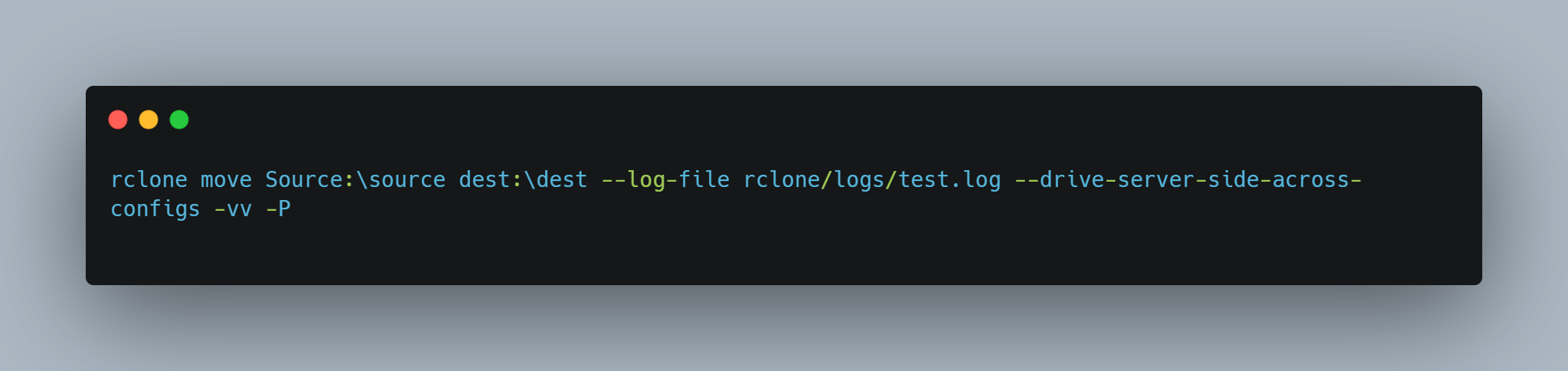
However, this method led to an error: "No export formats found for 'application/vnd.google-apps.form'." This error indicated that rclone was unable to handle Google Forms due to their unique format.
Method 2: Drive-to-Drive Transfer
Next, we explored the possibility of transferring the forms from the POI’s account to a dummy Google account (Drive-to-Drive transfer). This involved:
- Copying the forms to the dummy account.
- Attempting to move them from the dummy account to our desired destination.
Despite several adjustments and configurations, including using flags such as --drive-show-all-gdocs, we were unable to achieve the desired outcome. Issues like dangling shortcuts and incomplete transfers persisted, complicating the process further.
The Obstacles
Several challenges emerged during our attempts:
- Export Format Issues: Google Forms do not have export formats that
rclonecan handle, leading to persistent errors. - Dangling Shortcuts: Even with flags designed to skip shortcuts, we encountered issues related to dangling shortcuts, which affected the integrity of the data transfer.
- Complex Setup: The complexity of the POI’s Google account, which involved shared folders and shortcuts, further complicated our efforts.
The Solution
Given the challenges and the unsuccessful attempts with automated tools, we had to pivot to an alternative solution. After thorough consideration, we recommended the following approach to the lawyer:
- Password Reset: Reset the POI’s Google account password to gain access.
- Manual Extraction: Once access was secured, manually extract the required Google Forms.
This approach, although less automated, ensured that we could retrieve the necessary data securely and reliably.
Conclusion
The process of extracting Google Forms from a POI’s Google account involved navigating complex technical issues and exploring various methods. Despite our efforts with rclone and drive-to-drive transfers, the unique format of Google Forms and the complications with the POI’s account setup led us to a manual solution. By resetting the account password and performing a manual extraction, we ensured that the data was obtained in compliance with legal requirements.
This case underscores the importance of flexibility and adaptability when dealing with technical challenges in legal investigations. Sometimes, traditional methods and manual intervention are necessary to achieve the desired results.
If you have any questions or need further insights into handling similar cases, feel free to reach out. Additionally, if you have encountered a similar scenario and/or have tips for future methods of handling - I would love some insight.